
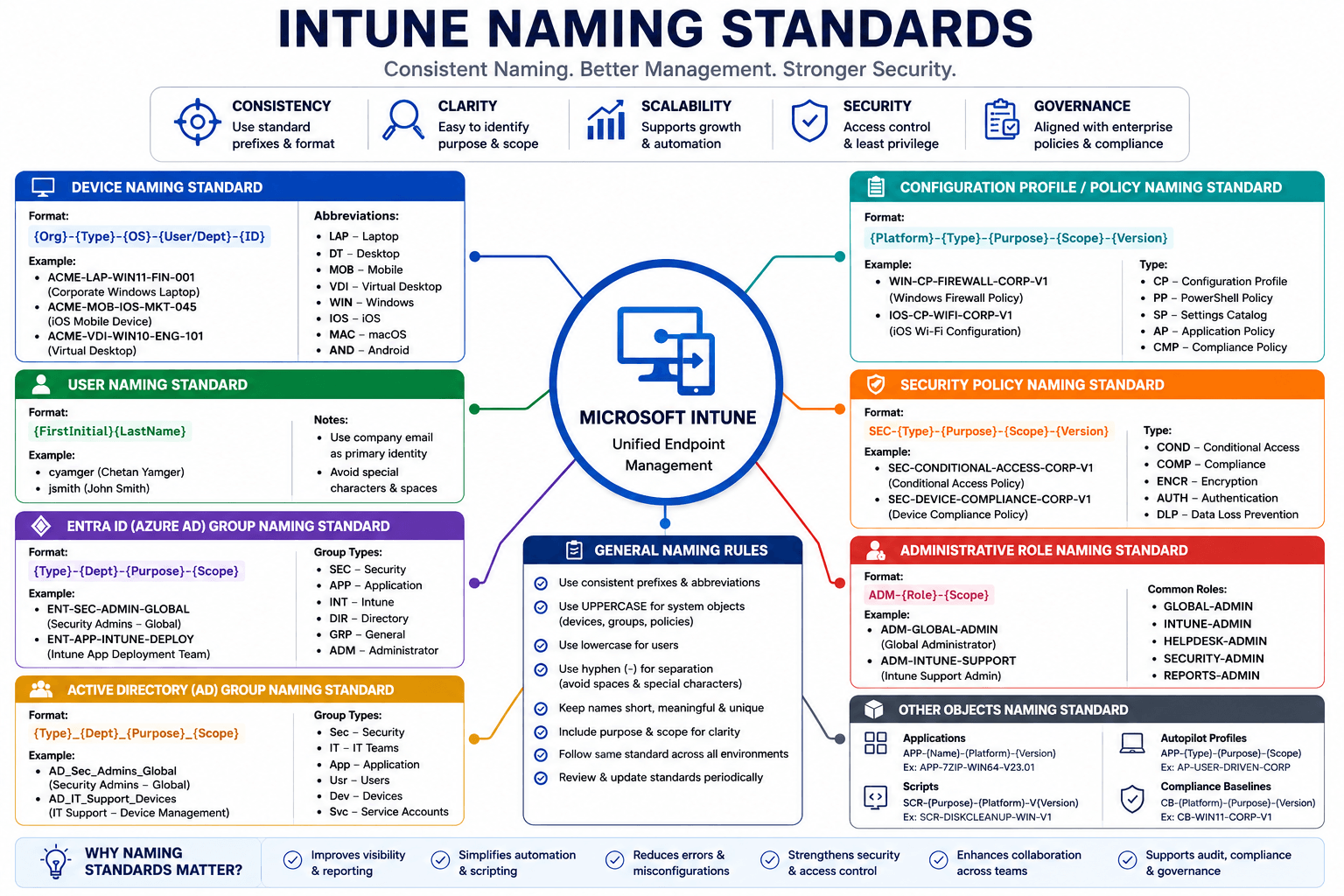
Enterprise Naming Standards: Devices, Users, Groups, Policies & More
A complete naming convention guide for enterprise IT environments — covering Intune, Entra ID, Active Directory, Conditional Access, Configuration Profiles, Security Policies, Service Accounts, and every object type an admin touches daily.
Walk into any enterprise IT environment without naming standards and you will find policies named "New policy - copy (2)", groups called "Test Group DO NOT DELETE", and devices registered as "DESKTOP-4K8HJ2Q". Nobody knows what they do. Nobody knows who owns them. And nobody wants to touch them.
Naming standards are not glamorous. They are not a feature. They are infrastructure — the invisible scaffolding that determines whether your Intune tenant is manageable at scale or a slow-moving disaster.
This guide covers every object type you will encounter in a Microsoft enterprise environment: users, admins, service accounts, devices, Entra groups, AD groups, Intune policies, Conditional Access, security baselines, and more. Every format is designed to be readable at a glance, sortable in a list, and meaningful six months after it was created.
Why Naming Standards Matter
The real cost of poor naming
A naming standard saved is a support ticket prevented. When an admin can read a policy name and instantly know its platform, scope, and purpose — without opening it — your whole team moves faster and makes fewer mistakes.
Before defining formats, understand what good naming achieves:
| Goal | Without standards | With standards |
|---|---|---|
| Find all Windows compliance policies | Open every policy | Filter by CMP-WIN- prefix |
| Know if a CA policy is in production | Open and read it | CA001-PRD- is self-evident |
| Understand who a service account belongs to | Ask around | SVC-Intune-GraphAPI is explicit |
| Sort policies by platform in a list | Impossible | Alphabetical sort groups them naturally |
| Onboard a new admin | Hours of hand-holding | Standard reads itself |
Core Design Principles
Before any format, five rules apply everywhere:
- Uppercase prefixes, lowercase descriptors —
CFG-WIN-bitlocker-encryptionreads better thancfgwinbitlockerencryption - Hyphens as separators, never underscores or spaces — spaces break scripts; underscores look like spaces in some UIs
- No special characters — parentheses, slashes, and ampersands break PowerShell filters and REST API calls
- Consistent component order — always
TYPE-PLATFORM-ENVIRONMENT-PURPOSE, never mix the order - Keep it short but not cryptic —
CFG-WIN-PRD-BitLockerbeatsConfig-Windows-Production-BitLockerEncryptionFullDisk
Environment and Platform Codes
Use these building blocks consistently across every object type.
Environment codes
| Code | Meaning |
|---|---|
PRD | Production |
UAT | User Acceptance Testing |
DEV | Development / Lab |
STG | Staging |
PIL | Pilot (limited production rollout) |
Platform codes
| Code | Meaning |
|---|---|
WIN | Windows 10 / 11 |
MAC | macOS |
iOS | iPhone / iPad |
AND | Android / Android Enterprise |
LIN | Linux |
VM | Virtual Machine / VDI |
AZ | Azure (cloud resource) |
Location codes (optional — use when multi-region)
| Code | Meaning |
|---|---|
NL | Netherlands |
UK | United Kingdom |
US | United States |
IN | India |
EU | Europe (regional) |
GLB | Global (no region restriction) |
Department codes
| Code | Meaning |
|---|---|
IT | Information Technology |
HR | Human Resources |
FIN | Finance |
OPS | Operations |
MKT | Marketing |
SEC | Security |
DEV | Development / Engineering |
EXC | Executive |
LEG | Legal |
1. User Accounts
Standard user accounts
The most common format is firstname.lastname@company.com. This is readable, predictable, and works with most directory sync tools.
Format:   firstname.lastname@company.com
Example:  chetan.yamger@contoso.com
For large organisations with common names, add a department or sequential number:
Format:   firstname.lastname.dept@company.com
Example:  john.smith.fin@contoso.com
          john.smith2@contoso.com  (duplicate resolution)
Shared mailboxes
Format:   SMB-{Department}-{Purpose}@company.com
Example:  SMB-IT-ServiceDesk@contoso.com
          SMB-HR-Recruitment@contoso.com
          SMB-FIN-Invoices@contoso.com
Resource mailboxes (rooms and equipment)
Format:   RES-{Location}-{Name}@company.com
Example:  RES-AMS-ConferenceRoom-A@contoso.com
          RES-LON-Projector-Floor2@contoso.com
2. Admin and Privileged Accounts
Admin accounts must be separate from standard user accounts — never use firstname.lastname@company.com for privileged tasks.
Never use your daily account for admin tasks
Privileged accounts should be cloud-only, MFA-enforced, and used exclusively for administrative tasks. Mixing daily use with admin access is the number one cause of credential compromise in enterprise environments.
Standard admin accounts (Entra ID / Microsoft 365 Admin)
Format:   ADM-{firstname}.{lastname}@company.com
Example:  ADM-chetan.yamger@contoso.com
On-premises privileged accounts (Active Directory)
For tiered administration (Tier 0 = DC/AD, Tier 1 = Servers, Tier 2 = Workstations):
Format:   {TIER}-{firstname}.{lastname}
Example:  T0-chetan.yamger    (Domain Controller / AD admin)
          T1-chetan.yamger    (Server admin)
          T2-chetan.yamger    (Workstation / Intune admin)
Break glass / emergency access accounts
Format:   BG-Admin{NN}@company.com
Example:  BG-Admin01@contoso.com
          BG-Admin02@contoso.com
Break glass account rules
Always have exactly 2 break glass accounts. Exclude them from ALL Conditional Access policies. Store credentials in a physical safe. Audit login alerts in Microsoft Sentinel. Never use them for routine admin tasks.
Global admin accounts
Global Admin is a permanent Tier 0 role. Accounts assigned to it must be cloud-only, have no licences, and be used only for break-glass scenarios (day-to-day admin should use PIM elevation).
Format:   GA-{Purpose}@company.com
Example:  GA-PrimaryAdmin@contoso.com
          GA-Backup@contoso.com
Service accounts
Format:   SVC-{ServiceName}-{Purpose}@company.com
Example:  SVC-Intune-GraphAPI@contoso.com
          SVC-SCCM-CMG@contoso.com
          SVC-PowerBI-DataRefresh@contoso.com
          SVC-AzureDevOps-Deploy@contoso.com
3. Device Naming
Device names appear in Intune, SCCM, Azure AD, and support tickets. A clear naming convention makes it instant to identify the device type, location, and owner.
Windows devices
Format:   {COMPANY}-{DEPT}-{TYPE}-{LOCATION}-{COUNTER}
Example:  CORP-IT-LAP-NL-0001      (IT dept laptop, Netherlands, #1)
          CORP-FIN-DT-UK-0042       (Finance desktop, UK, #42)
          CORP-IT-VM-AZ-0010        (IT virtual machine, Azure, #10)
Shorter format (for orgs with one location):
Format:   {COMPANY}-{TYPE}-{COUNTER}
Example:  CORP-LAP-0001
          CORP-DT-0042
          CORP-VM-0010
Device type codes
| Code | Meaning |
|---|---|
LAP | Laptop |
DT | Desktop |
VM | Virtual Machine |
TBL | Tablet |
WKS | Workstation (high-spec) |
SRV | Server |
KSK | Kiosk / Shared device |
Autopilot device naming (set in Deployment Profile)
Autopilot lets you define a device naming template that runs at provisioning time:
Template:   CORP-WIN-%RAND:4%
Result:     CORP-WIN-A7K2

Template:   CORP-%SERIAL%
Result:     CORP-SN123456789

Template:   %DEPT%-LAP-%RAND:4%
Result:     IT-LAP-9F3M
Use %RAND:4% carefully
Random suffixes are unique but not predictable. If you need to track the device back to a purchase order or serial number, use %SERIAL% instead.
macOS devices
Format:   {COMPANY}-MAC-{LOCATION}-{COUNTER}
Example:  CORP-MAC-NL-0001
          CORP-MAC-US-0015
Mobile devices (iOS / Android)
Mobile devices are harder to control naming for (especially BYOD). For corporate-owned devices:
Format:   {COMPANY}-{PLATFORM}-{DEPT}-{COUNTER}
Example:  CORP-iOS-IT-0001
          CORP-AND-FIN-0003
4. Entra ID (Azure AD) Groups
Groups are the backbone of policy assignment in Intune and Conditional Access. A clear naming standard is critical because group lists grow fast and become unmanageable without structure.
Format structure
Format: GRP-{TYPE}-{PLATFORM/DEPT}-{PURPOSE}-{SCOPE}
| Component | Options |
|---|---|
GRP | Fixed prefix — all groups start here |
TYPE | SEC (Security), M365 (Microsoft 365), DYN (Dynamic), MDM (Intune/MDM), CA (Conditional Access) |
PLATFORM/DEPT | WIN, MAC, iOS, AND, IT, FIN, etc. |
PURPOSE | Short readable description |
SCOPE | ALL, PRD, PIL, DEV (optional) |
Security groups
GRP-SEC-WIN-AllDevices-PRD
GRP-SEC-WIN-CompliantDevices-PRD
GRP-SEC-iOS-AllDevices-PRD
GRP-SEC-AND-CorporateOwned-PRD
GRP-SEC-MAC-AllDevices-PRD
GRP-SEC-IT-Department-PRD
GRP-SEC-FIN-Department-PRD
GRP-SEC-EXC-Executives-PRD
Dynamic device groups
GRP-DYN-WIN-AllWindowsDevices
GRP-DYN-WIN-AutopilotDevices
GRP-DYN-iOS-AllAppleDevices
GRP-DYN-AND-AndroidEnterprise
GRP-DYN-MAC-AllMacDevices
GRP-DYN-WIN-CompliantOnly
Dynamic membership rules to match:
# GRP-DYN-WIN-AllWindowsDevices
(device.deviceOSType -eq "Windows")

# GRP-DYN-iOS-AllAppleDevices
(device.deviceOSType -eq "iPhone") -or (device.deviceOSType -eq "iPad")

# GRP-DYN-AND-AndroidEnterprise
(device.deviceOwnership -eq "Company") -and (device.deviceOSType -eq "AndroidForWork")

# GRP-DYN-WIN-AutopilotDevices
(device.devicePhysicalIds -any (_ -startsWith "[ZTDID]"))
Intune / MDM-specific groups
GRP-MDM-WIN-EnrolledDevices-PRD
GRP-MDM-WIN-PilotRing-BitLocker
GRP-MDM-iOS-MAMEnabled-PRD
GRP-MDM-AND-WorkProfile-PRD
GRP-MDM-WIN-ExcludeFromCompliance
GRP-MDM-WIN-KioskDevices
Conditional Access groups
GRP-CA-ExcludeBreakGlass          (always excluded from every CA policy)
GRP-CA-ExcludeServiceAccounts     (service accounts excluded from user-facing policies)
GRP-CA-PilotUsers-MFA             (pilot ring for new CA policies)
GRP-CA-ExternalGuests             (guest/B2B users)
GRP-CA-PrivilegedAdmins           (accounts with admin roles)
GRP-CA-NamedLocations-Trusted     (users in trusted office locations)
Microsoft 365 groups (Teams, SharePoint)
GRP-M365-IT-InternalTeam
GRP-M365-FIN-Finance-Department
GRP-M365-OPS-Operations
GRP-M365-PRJ-ProjectAlpha-2026
GRP-M365-EXC-Leadership
5. On-Premises Active Directory Groups
AD groups follow a different convention from Entra ID. They must encode the group scope and type.
AD group scope codes
| Code | Meaning |
|---|---|
DL | Domain Local — permission assignment within one domain |
GG | Global Group — member scope, cross-domain |
UG | Universal Group — forest-wide scope |
Format
Format: {SCOPE}-{CATEGORY}-{PURPOSE}
Examples
# Resource access groups (Domain Local — assign permissions)
DL-SharePoint-Finance-ReadOnly
DL-FileShare-IT-ReadWrite
DL-Printer-Floor3-Print

# User / department groups (Global — contain members)
GG-Dept-Finance
GG-Dept-IT
GG-Dept-HR
GG-Dept-Operations

# Distribution / mail-enabled groups
GG-Mail-AllStaff
GG-Mail-IT-Department
GG-Mail-Management

# Admin tier groups
GG-Admins-Tier0-DomainAdmins
GG-Admins-Tier1-ServerAdmins
GG-Admins-Tier2-HelpdeskTech

# Group Policy assignment groups
GG-GPO-BitLocker-Workstations
GG-GPO-Screensaver-AllUsers
GG-GPO-IE-Restrictions-Finance
6. Intune Configuration Profiles
Configuration profiles are where naming discipline pays off most. A tenant can have hundreds. Without a standard, finding the right one becomes a daily frustration.
Format
Format: CFG-{PLATFORM}-{ENV}-{PURPOSE}
Windows configuration profiles
CFG-WIN-PRD-BitLocker-Encryption
CFG-WIN-PRD-Security-Baseline-CIS
CFG-WIN-PRD-Windows-Update-DeploymentRing-Broad
CFG-WIN-PRD-Windows-Update-DeploymentRing-Pilot
CFG-WIN-PRD-Windows-Hello-BusinessPolicy
CFG-WIN-PRD-Firewall-Domain-Profile
CFG-WIN-PRD-Firewall-Public-Profile
CFG-WIN-PRD-AppLocker-Standard
CFG-WIN-PRD-StartMenu-Layout-Standard
CFG-WIN-PRD-VPN-AlwaysOn-Split
CFG-WIN-PRD-WiFi-Corporate-SSID
CFG-WIN-PRD-Certificate-SCEP-User
CFG-WIN-PRD-Certificate-SCEP-Device
CFG-WIN-PRD-LAPS-Configuration
CFG-WIN-PRD-RemoteDesktop-Disabled
CFG-WIN-PRD-Kiosk-SingleApp-Browser
CFG-WIN-PIL-BitLocker-Encryption      (Pilot ring — same policy, smaller group)
iOS configuration profiles
CFG-iOS-PRD-Email-ExchangeOnline
CFG-iOS-PRD-WiFi-Corporate-SSID
CFG-iOS-PRD-VPN-PerApp-O365
CFG-iOS-PRD-Certificate-SCEP-User
CFG-iOS-PRD-Passcode-Policy-Standard
CFG-iOS-PRD-Restrictions-BrowserBlock
CFG-iOS-PRD-Supervised-Kiosk
macOS configuration profiles
CFG-MAC-PRD-FileVault-Encryption
CFG-MAC-PRD-Firewall-Enable
CFG-MAC-PRD-Security-Baseline
CFG-MAC-PRD-WiFi-Corporate-SSID
CFG-MAC-PRD-Certificate-SCEP-User
CFG-MAC-PRD-Gatekeeper-AppStore
Android Enterprise
CFG-AND-PRD-WorkProfile-Restrictions
CFG-AND-PRD-WiFi-Corporate-SSID
CFG-AND-PRD-Certificate-SCEP-Work
CFG-AND-PRD-Kiosk-DedicatedDevice
CFG-AND-PRD-Email-WorkProfile
7. Compliance Policies
Compliance policies determine whether a device is "Compliant" or "Non-Compliant" — directly linked to Conditional Access enforcement.
Format
Format: CMP-{PLATFORM}-{ENV}-{PURPOSE}
Examples
CMP-WIN-PRD-Corporate-Baseline
CMP-WIN-PRD-High-Security-Finance
CMP-WIN-PIL-Corporate-Baseline         (Pilot rollout)
CMP-iOS-PRD-Corporate-Standard
CMP-iOS-PRD-BYOD-Minimum
CMP-AND-PRD-Corporate-WorkProfile
CMP-AND-PRD-BYOD-Minimum
CMP-MAC-PRD-Corporate-Baseline
One baseline + one strict
For each platform, maintain exactly two compliance policies: a baseline (applies to all users) and a strict policy (applies to high-security departments like Finance and HR). Use Conditional Access to enforce stricter requirements for sensitive apps.
8. App Protection Policies (MAM)
Mobile Application Management (MAM) policies protect data inside apps — even on unmanaged BYOD devices.
Format
Format: MAM-{PLATFORM}-{MGMT}-{PURPOSE}
| Component | Meaning |
|---|---|
MGMT | MDM (device enrolled), MAM (app-only, BYOD), MAMWE (MAM without enrollment) |
Examples
MAM-iOS-MDM-Corporate-ManagedApps
MAM-iOS-MAMWE-BYOD-O365Apps
MAM-AND-MDM-Corporate-ManagedApps
MAM-AND-MAMWE-BYOD-O365Apps
MAM-WIN-MDM-Corporate-Edge
9. Conditional Access Policies
CA policy naming is the most critical of all — a misconfigured CA policy can lock out your entire organisation. The name must tell you what it does before you even open it.
Format
Format: CA{NNN}-{TARGET}-{CONDITION}-{ACTION}
| Component | Meaning |
|---|---|
CA{NNN} | Sequential number (CA001, CA002…) — keeps policies sorted |
TARGET | Who the policy applies to |
CONDITION | The trigger / signal being evaluated |
ACTION | What happens (Grant/Block/Session) |
Complete baseline set (10 policies)
CA001-AllUsers-AllApps-RequireMFA
CA002-AllUsers-AllApps-BlockLegacyAuthentication
CA003-AllUsers-O365Apps-RequireCompliantDevice
CA004-PrivilegedAdmins-AllApps-RequireMFA-CompliantDevice
CA005-PrivilegedAdmins-AzurePortal-RequireCompliantDevice
CA006-AllUsers-AllApps-BlockHighRiskUser
CA007-AllUsers-AllApps-BlockHighRiskSignin
CA008-AllUsers-AllApps-BlockUnknownLocations
CA009-GuestUsers-AllApps-RestrictAccess
CA010-ServiceAccounts-AllApps-BlockWithExceptions
Always use Report-Only mode first
Every CA policy starts in Report-Only. Monitor for 14 days in the Sign-in logs before enabling. See the CA baseline guide for full testing protocol.
Named Locations (used in CA conditions)
NL-TrustedLocation-Amsterdam-Office
NL-TrustedLocation-VPN-CorporateGateway
NL-CountryBlock-HighRiskCountries
NL-CountryAllow-EuropeOnly
10. Security Policies (Endpoint Security)
Endpoint Security policies in Intune cover antivirus, firewall, disk encryption, attack surface reduction, and endpoint detection.
Format
Format: SEC-{PLATFORM}-{TYPE}-{PURPOSE}
TYPE code | Policy type |
|---|---|
AV | Antivirus |
FW | Firewall |
EDR | Endpoint Detection & Response |
ASR | Attack Surface Reduction |
ENC | Disk Encryption |
LAPS | Local Admin Password Solution |
SEC | Security Baseline |
Examples
SEC-WIN-AV-Defender-Standard
SEC-WIN-AV-Defender-HighSecurity-Finance
SEC-WIN-FW-Domain-Profile
SEC-WIN-FW-Public-Profile
SEC-WIN-FW-Private-Profile
SEC-WIN-EDR-MDE-Onboarding
SEC-WIN-ASR-Rules-Standard
SEC-WIN-ASR-Rules-HighSecurity
SEC-WIN-ENC-BitLocker-OSVolume
SEC-WIN-ENC-BitLocker-DataDrive
SEC-WIN-LAPS-Configuration-Standard
SEC-WIN-SEC-Baseline-CIS-L1
SEC-MAC-AV-Defender-Standard
SEC-MAC-FW-Enable-Standard
11. Windows Update Rings
Update rings control how quickly Windows updates reach your devices. Structure them as deployment rings.
Format: UPD-WIN-{RING}-{PURPOSE}
| Ring | Meaning |
|---|---|
PILOT | IT team / 5% of users — first to receive updates |
EARLY | Early adopters — 15% of users, 1 week after Pilot |
BROAD | All remaining users — 4 weeks after Pilot |
DEFER | Sensitive systems — maximum deferral |
Examples
UPD-WIN-PILOT-QualityUpdates-7Day
UPD-WIN-EARLY-QualityUpdates-14Day
UPD-WIN-BROAD-QualityUpdates-21Day
UPD-WIN-PILOT-FeatureUpdates-30Day
UPD-WIN-BROAD-FeatureUpdates-90Day
UPD-WIN-DEFER-FeatureUpdates-180Day
12. Service Principals and App Registrations
Service Principals in Entra ID represent application identities — used for automation, integrations, and Graph API access.
Format
Format: SPN-{ServiceName}-{Purpose}-{ENV}
Examples
SPN-Intune-GraphAPI-PRD
SPN-PowerBI-DataRefresh-PRD
SPN-PowerShell-Automation-PRD
SPN-AzureDevOps-Deployment-DEV
SPN-LogicApps-M365-Integration-PRD
SPN-Sentinel-DataConnector-PRD
SPN-SCCM-CloudManagement-PRD
SPN-PowerAutomate-SharePoint-PRD
Client secrets must be tracked
Every SPN with a client secret needs a renewal reminder. Name the secret the same as the SPN: SPN-Intune-GraphAPI-PRD-Secret-2026-05. Calendar a renewal 30 days before expiry.
13. Administrative Units
Administrative Units (AUs) in Entra ID allow scoped administration — an admin can manage only users/devices within their AU.
Format: AU-{SCOPE}-{PURPOSE}
Examples
AU-GLB-BreakGlass-Accounts
AU-GLB-ServiceAccounts
AU-DEPT-Finance
AU-DEPT-HR
AU-DEPT-IT-Operations
AU-RGN-Europe
AU-RGN-NL-Amsterdam
AU-RGN-UK-London
14. Azure Resources and Resource Groups
For Azure infrastructure resources (if your scope extends beyond Intune/Entra):
Format: RG-{ENV}-{Purpose}-{Location}
Examples
RG-PRD-Intune-Resources-WEU
RG-PRD-Sentinel-Security-WEU
RG-PRD-KeyVault-Secrets-WEU
RG-DEV-Testing-Lab-WEU
RG-PRD-BackupVault-DR-NEU
Location abbreviations: WEU (West Europe), NEU (North Europe), EUS (East US), WUS (West US).
Complete Reference Cheat Sheet
| Object Type | Format | Example |
|---|---|---|
| User account | firstname.lastname@company.com | chetan.yamger@contoso.com |
| Admin account | ADM-firstname.lastname@company.com | ADM-chetan.yamger@contoso.com |
| Service account | SVC-ServiceName-Purpose@company.com | SVC-Intune-GraphAPI@contoso.com |
| Break glass | BG-Admin{NN}@company.com | BG-Admin01@contoso.com |
| Global Admin | GA-Purpose@company.com | GA-Primary@contoso.com |
| Shared mailbox | SMB-Dept-Purpose@company.com | SMB-IT-ServiceDesk@contoso.com |
| Windows device | CORP-DEPT-TYPE-LOC-NNNN | CORP-IT-LAP-NL-0001 |
| Entra Security group | GRP-SEC-PLATFORM-Purpose-ENV | GRP-SEC-WIN-AllDevices-PRD |
| Entra Dynamic group | GRP-DYN-PLATFORM-Purpose | GRP-DYN-WIN-AutopilotDevices |
| Intune MDM group | GRP-MDM-PLATFORM-Purpose-ENV | GRP-MDM-iOS-MAMEnabled-PRD |
| CA exclude group | GRP-CA-Purpose | GRP-CA-ExcludeBreakGlass |
| M365 group | GRP-M365-DEPT-Purpose | GRP-M365-FIN-Finance |
| AD Domain Local | DL-Resource-Purpose-Permission | DL-FileShare-IT-ReadWrite |
| AD Global group | GG-Category-Purpose | GG-Dept-Finance |
| Config profile | CFG-PLATFORM-ENV-Purpose | CFG-WIN-PRD-BitLocker-Encryption |
| Compliance policy | CMP-PLATFORM-ENV-Purpose | CMP-WIN-PRD-Corporate-Baseline |
| App protection | MAM-PLATFORM-MGMT-Purpose | MAM-iOS-MAMWE-BYOD-O365Apps |
| CA policy | CA{NNN}-Target-Condition-Action | CA001-AllUsers-AllApps-RequireMFA |
| Named location | NL-Region-Purpose | NL-TrustedLocation-Amsterdam-Office |
| Security policy | SEC-PLATFORM-TYPE-Purpose | SEC-WIN-AV-Defender-Standard |
| Update ring | UPD-WIN-RING-Purpose | UPD-WIN-BROAD-QualityUpdates-21Day |
| Service Principal | SPN-ServiceName-Purpose-ENV | SPN-Intune-GraphAPI-PRD |
| Admin Unit | AU-SCOPE-Purpose | AU-DEPT-Finance |
| Azure Resource Group | RG-ENV-Purpose-Location | RG-PRD-Intune-Resources-WEU |
Common Mistakes and How to Avoid Them
Mistakes that will haunt you
These naming anti-patterns appear in almost every enterprise tenant that grew organically. Fix them early — they get exponentially harder to fix later.
1. No prefix on groups
Bad: All Windows Devices, Finance Staff, MFA Required Group
Good: GRP-DYN-WIN-AllWindowsDevices, GRP-SEC-FIN-Department-PRD, GRP-CA-PilotUsers-MFA
Without a prefix, groups from different systems, departments, and purposes all appear mixed together in a flat list.
2. Copying policies without renaming
Bad: BitLocker Policy - Copy, New compliance policy (3), Test - DO NOT DELETE
Good: CFG-WIN-PRD-BitLocker-Encryption (create from scratch with the right name)
Copied policies accumulate. After 12 months you have 40 "Copy" policies and nobody knows which ones are active.
3. Using dates in policy names
Bad: MFA Policy May 2024, Compliance Baseline Updated 2025
Good: CA001-AllUsers-AllApps-RequireMFA (version in the description field, not the name)
Dates in names make the display name stale the moment you update the policy. Use the description field or notes for change history.
4. Abbreviating inconsistently
Bad: Win-Bit-Lock, WIN-Bitlocker, windows bitlocker, WindowsBitlockerPol
Good: CFG-WIN-PRD-BitLocker-Encryption — same format every time
Pick one abbreviation per concept and document it. WIN not Windows not Win. BitLocker not Bitlock not BL.
5. No environment prefix on pilot policies
Bad: BitLocker Policy (and nobody knows if this is for 5 pilot devices or 5,000 production devices)
Good: CFG-WIN-PIL-BitLocker-Encryption assigned to GRP-MDM-WIN-PilotRing-BitLocker
Always distinguish pilot from production in the name. It prevents accidental broad deployment.
Implementation Steps
Step 1: Document your standard
Write your naming convention in a shared document (SharePoint, Confluence, or a Teams Wiki). Include every format, every code, and at least three examples per object type. Link it from your IT onboarding docs. A standard that only exists in someone's head is not a standard.
Step 2: Audit your current environment
Export all existing groups, policies, devices, and accounts. In Intune, use the Reports section or run PowerShell with the Graph API. In Entra ID, use the Export function in each blade. Flag everything that does not match your new standard.
Step 3: Rename in waves, not all at once
Rename in batches by object type: start with groups (lowest risk), then policies (check assignments after each rename), then accounts last (accounts can break mail flow and authentication if renamed incorrectly). Never rename service accounts without testing.
Step 4: Use the standard for all new objects
The moment the standard is documented, freeze non-compliant naming for all new objects. Existing objects can be renamed gradually. New objects must follow the standard from day one — no exceptions.
Step 5: Validate with Graph API / PowerShell
Use PowerShell to verify compliance. The script below lists all Entra ID groups that do NOT start with GRP-:
Connect-MgGraph -Scopes "Group.Read.All"
Get-MgGroup -All | Where-Object { $_.DisplayName -notmatch '^GRP-' } |
  Select-Object DisplayName, GroupTypes, MembershipRule |
  Sort-Object DisplayName |
  Export-Csv -Path "NonCompliantGroups.csv" -NoTypeInformation
Step 6: Enforce via governance
Add naming validation to your change management process. Any new group, policy, or account request must include the proposed name. The approver checks it against the standard before it goes live. For large teams, consider Azure Policy or Microsoft Purview governance controls.
PowerShell: Bulk Rename Intune Config Profiles
Here is a PowerShell script that lists all Intune configuration profiles and shows which ones do not follow the CFG- prefix convention:
Connect-MgGraph -Scopes "DeviceManagementConfiguration.Read.All"

$profiles = Get-MgDeviceManagementDeviceConfiguration -All

$nonCompliant = $profiles | Where-Object {
    $_.DisplayName -notmatch '^CFG-'
}

Write-Host "Non-compliant configuration profiles:" -ForegroundColor Yellow
$nonCompliant | Select-Object DisplayName, ODataType | Format-Table -AutoSize

Write-Host "`nTotal non-compliant: $($nonCompliant.Count) of $($profiles.Count)" -ForegroundColor Cyan
Summary
Naming standards are a one-time investment that pays dividends for the entire life of your tenant. The conventions in this guide are designed to:
- Be self-documenting — the name tells you everything about the object
- Sort correctly in lists — alphabetical order groups related objects together naturally
- Work in scripts — no special characters, consistent separators, predictable structure
- Scale to hundreds of objects — the prefix system handles any size tenant
Start with the objects you create most often (groups and policies), apply the standard consistently, and document it where every admin on your team can find it. The environment will thank you later — even if that future admin is yourself.

Written by
Chetan Yamger
Cloud Engineer · AI Automation Architect · Modern Workplace Consultant
Cloud Engineer, AI Automation Architect, and Modern Workplace Consultant based in Amsterdam, Netherlands. Specializing in scalable, secure enterprise solutions with Microsoft Azure, Intune, PowerShell, and AI-driven automation using ChatGPT, Gemini, and modern LLM technologies.
Stay in the loop.
New articles, straight to you.
Deep-dive technical articles on Intune, PowerShell, and AI — no noise, no spam.
Discussion
Share your thoughts — your email stays private
Leave a comment